The Design
Engineering Pad: green computation paper with a title block on every note and numbered sections, drawn as a blueprint in dark mode. This note shows everything a note can contain.
The design is called Engineering Pad, after the green, gridded computation paper engineers used to work problems on. It's phone first, and it switches to a blueprint when the device is in dark mode.
The parts of a page
Title block
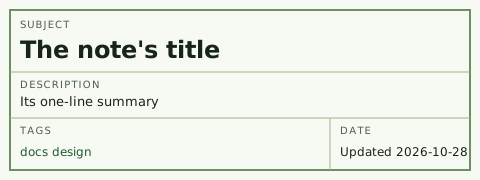
The box at the top of every note is a drawing's title block: Subject, Description, Tags, and Date. They come straight from the front matter (see Writing a Note).
Numbered sections
Sections are numbered 1, 1.1, 1.2, and so on, like a specification, so "see 2.1" means something. The contents box uses the same numbers, and on a wide screen it sits beside the text and marks the section you're reading.
Everything a note can contain
Lists and tasks
A bullet, drawn as a dash.
A second bullet, with a link.
A finished task gets a drafting X.
An open task is an empty box.
Tables
| Element | Drawn as |
|---|---|
| Section heading | Capitals over a rule |
| Break within a section | A dimension line |
| Table | A solid box, scrolling sideways on a phone |
Quotes, code, and footnotes
A quote sits behind a ruled line, in italics.
Inline code and blocks of it are set in IBM Plex Mono:
const note = parseNote(text);
Footnotes collect at the bottom of the note.1
Type
Three cuts of IBM Plex: Sans for reading, Sans Condensed for headings, and Mono for labels, dates, and tags. All of it is self-hosted, and everything scales from one root size, set 40% larger than the browser default.
Footnotes
-
Like this one. ↩